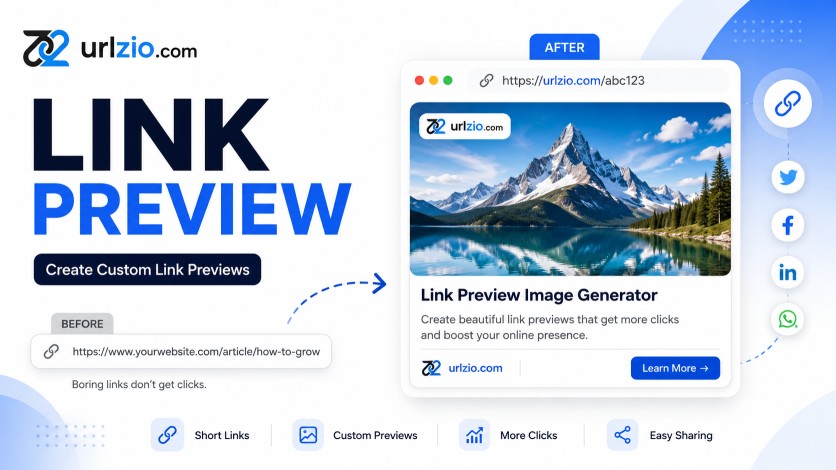
Link Preview Image Generator: Create Custom Link Previews That Get More Clicks
A link preview image generator helps you create attractive and professional previews for your URLs. Instead of sharing a plain link, you can display a custom image, title, description, and branding information when your link is shared online.
With URLzio, you can combine short links with customized link previews, providing tools for generating short urls with previews to create a better sharing experience for social media, marketing campaigns, websites, blogs, products, and online content.
What Is a Link Preview Image Generator?
A link preview image generator is a tool that allows you to customize how a URL appears when it is shared on social media platforms, messaging apps, websites, and other digital channels.
A custom link preview can include several important elements:
- Custom link preview image
- Link title
- Link description
- Brand name or logo
- Short URL
These elements provide users with more information about the destination before they click the link. A well-designed custom link preview can also make your shared content look more professional and recognizable.
Why Use a Custom Link Preview Image?
When a URL is shared without a properly configured preview, users may see only a plain link or automatically generated information. A custom URL preview gives you more control over how your content is presented.
Make Your Links More Attractive
A relevant and high-quality preview image can make a shared URL more noticeable in social media feeds, messaging conversations, and online communities.
Improve Brand Visibility
Businesses can use branded images, logos, colors, and consistent messaging to create recognizable link previews across different marketing channels.
Give Users More Context
A combination of an image, title, and description helps users understand what they can expect from the destination page before opening the link.
Create Professional Link Shares
Short URLs combined with customized previews can create a cleaner and more professional presentation for marketing campaigns, product pages, blog posts, and other online content.
How URLzio Works as a Link Preview Generator
URLzio is a URL shortening and link management platform that helps users create short, shareable links with customizable link presentation.
Using URLzio, you can create a shortened URL and customize important preview information, including:
- Preview image
- Title
- Description
- Short link
This makes URLzio useful for marketers, content creators, businesses, bloggers, publishers, affiliate marketers, and anyone who regularly shares links online.
Instead of sharing a long and difficult-to-remember URL, you can create a shorter link with a more informative and visually appealing preview.
Benefits of Using a Link Preview Image Generator
1. Better Link Presentation
A custom link preview transforms a basic URL into a visual piece of content that provides users with useful information before they visit the destination.
2. Stronger Brand Recognition
Using consistent images, logos, colors, and messaging across your link previews can help reinforce your brand identity.
3. Better Social Media Sharing
Custom link previews can make shared URLs more informative and visually appealing on platforms that support link preview metadata.
4. More Effective Marketing Campaigns
Marketers can create campaign-specific images, titles, and descriptions that match the content being promoted.
5. Improved User Experience
Users can understand the purpose of a link more quickly when the shared URL contains relevant visual and textual information.
How Businesses Can Use Custom Link Previews
E-commerce Product Links
Online stores can use product images, product names, and descriptions when sharing product pages. This gives potential customers immediate context about the product.
Blog and Content Marketing
Bloggers and publishers can create custom previews for articles, tutorials, guides, and other content to make their links more informative when shared.
Social Media Marketing
Marketing teams can use branded link preview images when distributing campaigns, promotions, announcements, and landing pages across social platforms.
Affiliate Marketing
Affiliate marketers can use short links and relevant visual previews to create cleaner promotional links for products and services.
Business Campaigns
Companies can create campaign-specific link previews for product launches, events, special offers, newsletters, and promotional landing pages.
Best Practices for Creating Link Preview Images
A link preview image should not simply look attractive. It should accurately represent the content users will find after clicking the link.
Use a Relevant Image
Choose an image that directly relates to the destination page. Avoid misleading images that may create a disconnect between the preview and the actual content.
Create a Clear Title
Use a concise title that immediately communicates what the destination page offers or contains.
Write an Informative Description
Your description should provide additional context without repeating the title unnecessarily. Keep it concise and relevant to the destination page.
Use Consistent Branding
Include appropriate brand elements such as logos, colors, typography, and visual styles to create consistent previews across your campaigns.
Optimize Preview Images
Use high-quality images that are properly sized and compressed. Large or poorly optimized images can negatively affect loading performance and sharing experiences.
Match the Preview With the Destination
The image, title, and description should accurately represent the linked content. Avoid clickbait or misleading preview information.
Link Preview Image Generator vs. Plain URL
| Plain URL | Custom Link Preview |
|---|---|
| Provides mainly the URL | Provides image, title, and description |
| Limited visual information | Rich visual presentation |
| Generic appearance | Customizable branding |
| Less context before clicking | More context before clicking |
| Limited control | Greater control over presentation |
SEO and Link Preview Images
Link preview images are primarily related to how your content is presented when URLs are shared. They should not be confused with a direct Google ranking factor.
For SEO, the more important elements include high-quality content, relevant keywords, descriptive page titles, useful headings, internal linking, crawlable pages, and a good user experience.
However, optimizing your page's social sharing metadata can improve how the page appears when people share it on supported platforms. This can make your content easier to recognize and potentially increase referral traffic.
For a complete SEO strategy, use your primary keyword naturally in the page title, H1, introduction, relevant H2 headings, body content, image alt text, meta description, and URL where appropriate.
URLzio Link Shortener and Link Management
URLzio provides tools for creating and managing short links for different online use cases.
Whether you are promoting a product, sharing a blog article, running a social media campaign, or distributing an affiliate link, URLzio helps you create shorter and more manageable URLs.
You can also explore these related resources:
- Image URL Shortener: What It Is and How It Can Boost Engagement
- How to Use URLzio Short Links for Marketing
Frequently Asked Questions About Link Preview Image Generators
What is a link preview image generator?
A link preview image generator is a tool that helps customize the image, title, and description associated with a URL when it is shared online.
What is a custom link preview?
A custom link preview is a manually configured preview containing elements such as a specific image, title, description, and branding instead of relying completely on automatically generated information.
Can I add a custom image to a short URL?
Yes. URLzio allows users to customize their link presentation with visual content and other preview information.
Why are link preview images important?
Link preview images provide visual context and can make shared URLs more recognizable and informative compared with plain text links.
Can businesses use link preview generators?
Yes. Businesses can use custom link previews for e-commerce products, blog articles, social media campaigns, promotional landing pages, affiliate marketing, and other digital campaigns.
Does a link preview image improve SEO?
A link preview image itself is not a direct guarantee of improved search rankings. However, properly optimized social sharing information can improve how your content is presented when shared and may help generate additional referral traffic.
Can I track my short links with URLzio?
Yes. URLzio provides link tracking and performance insights that can help you monitor how your shared links perform.
Can URLzio work as a website preview image generator?
Yes. URLzio lets you create short links with customized link previews, helping you control how your shared URLs appear across social media, websites, blogs, and other online platforms.
Conclusion
A link preview image generator helps transform ordinary URLs into more informative and visually appealing links. Custom images, titles, descriptions, and branding can improve the presentation of links across social media, messaging platforms, marketing campaigns, and other digital channels.
With URLzio, you can combine short URLs with customized link presentation to create cleaner, more professional, and more manageable links.
Create your short links with URLzio and take more control over how your links are shared online.