LinkedIn has become one of the most important platforms for professional networking, personal branding, recruitment, and business growth. Professionals share LinkedIn profile links on resumes, portfolios, email signatures, business cards, websites, and social media platforms.
However, many LinkedIn URLs are long, difficult to remember, and not visually attractive. A long LinkedIn profile URL may contain unnecessary numbers, characters, or profile identifiers that make it harder to share professionally.
This is why many professionals and businesses choose to shorten LinkedIn URL. A shortened LinkedIn URL creates a cleaner, easier-to-share link while improving the overall appearance of your online presence.
Why Should You Shorten LinkedIn URL?
A LinkedIn profile represents your professional identity. The link you share should also look professional. A clean short link can create a stronger first impression when someone views your resume, portfolio, or marketing material.
Make Your LinkedIn Profile Easier to Share
Long URLs are difficult to copy, type, and remember. A shortened LinkedIn URL is much easier to share through email, messages, presentations, and offline materials.
Create a Professional Brand Image
Recruiters, clients, and business partners often judge professionalism through small details. A simple and organized link can make your digital profile look more polished.
Improve Marketing Campaigns
Businesses and marketers often use LinkedIn to promote services, products, company pages, and professional content. Short LinkedIn links make campaigns cleaner and easier to manage.
What Is a LinkedIn URL Shortener?
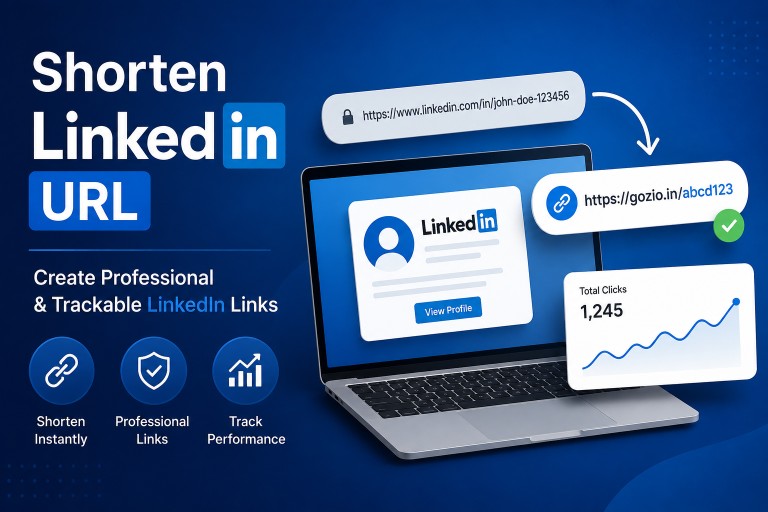
A LinkedIn URL shortener is a tool that converts a long LinkedIn address into a shorter version that redirects users to the original LinkedIn page.
For example:
Long URL:
linkedin.com/in/professional-name-123456789
Short URL:
urlzio.com/linkedin-profile
The destination remains the same, but the short version is easier to remember and share.
How to Shorten LinkedIn URL With Urlzio
Urlzio helps users create short links from long URLs while providing link management features. Professionals, creators, and businesses can use Urlzio to transform LinkedIn URLs into cleaner and more manageable links.
Visit Urlzio: Create Short Links With Urlzio
Using Urlzio, users can:
- Create clean short URLs
- Customize link appearance
- Manage professional links
- Track link performance
- Improve social sharing experience
Benefits of Shortening LinkedIn URLs
Better Resume Presentation
Adding a short LinkedIn URL to your resume makes your application look cleaner. Recruiters can easily access your professional profile without dealing with a complicated web address.
Better Email Signature Links
Professionals often include LinkedIn profiles in email signatures. A short link saves space and creates a more organized appearance.
Improved Social Sharing
When sharing LinkedIn content on other platforms, a short URL looks more professional and encourages users to click.
Better Link Management
Businesses managing multiple LinkedIn campaigns can organize and monitor their links more effectively.
Use Cases for Short LinkedIn URLs
Job Seekers
Job seekers can add a shortened LinkedIn profile link to resumes, portfolios, and applications. This makes it easier for employers to view professional experience.
Recruiters
Recruiters can share candidate profiles and job-related LinkedIn content using cleaner links.
Business Owners
Entrepreneurs can use short LinkedIn links to promote company pages, team profiles, and business content.
Content Creators
LinkedIn creators can share articles, posts, and professional resources with more attractive URLs.
Track Your Shortened LinkedIn URL Performance
A modern short link is not only about reducing URL length. Analytics can help users understand how their links perform.
With link tracking, businesses can analyze:
- Number of clicks
- Audience engagement
- Campaign performance
- Traffic activity
This information helps marketers improve their LinkedIn strategy and understand what type of content attracts attention.
Best Practices When You Shorten LinkedIn URL
- Use a simple and memorable short link.
- Keep the link related to your profile or campaign.
- Avoid unnecessary characters.
- Create separate links for different promotions.
- Monitor performance regularly.
Related Urlzio Resources
Frequently Asked Questions
How can I shorten LinkedIn URL?
You can shorten a LinkedIn URL by using a URL shortening platform like Urlzio. Add your LinkedIn link and create a shorter professional version.
Why should professionals shorten LinkedIn links?
Short LinkedIn links are easier to share, look more professional, and improve personal branding.
Can I track a shortened LinkedIn URL?
Yes. Urlzio provides link management and analytics features to help understand link performance.
Who can benefit from shortened LinkedIn URLs?
Job seekers, businesses, recruiters, marketers, and creators can all benefit from cleaner LinkedIn links.
Conclusion
Learning how to shorten LinkedIn URL is a simple but effective way to improve professional online sharing. A clean and trackable link creates a better impression, improves accessibility, and helps businesses measure engagement.
With Urlzio, users can transform long LinkedIn URLs into professional short links while managing and improving their digital campaigns.